2026 前端 AI Agent 工程化实战营系列第 5 篇
本文整理自《2026 前端 AI Agent 工程化实战营》课程资料,作为系列文章第 5 篇。
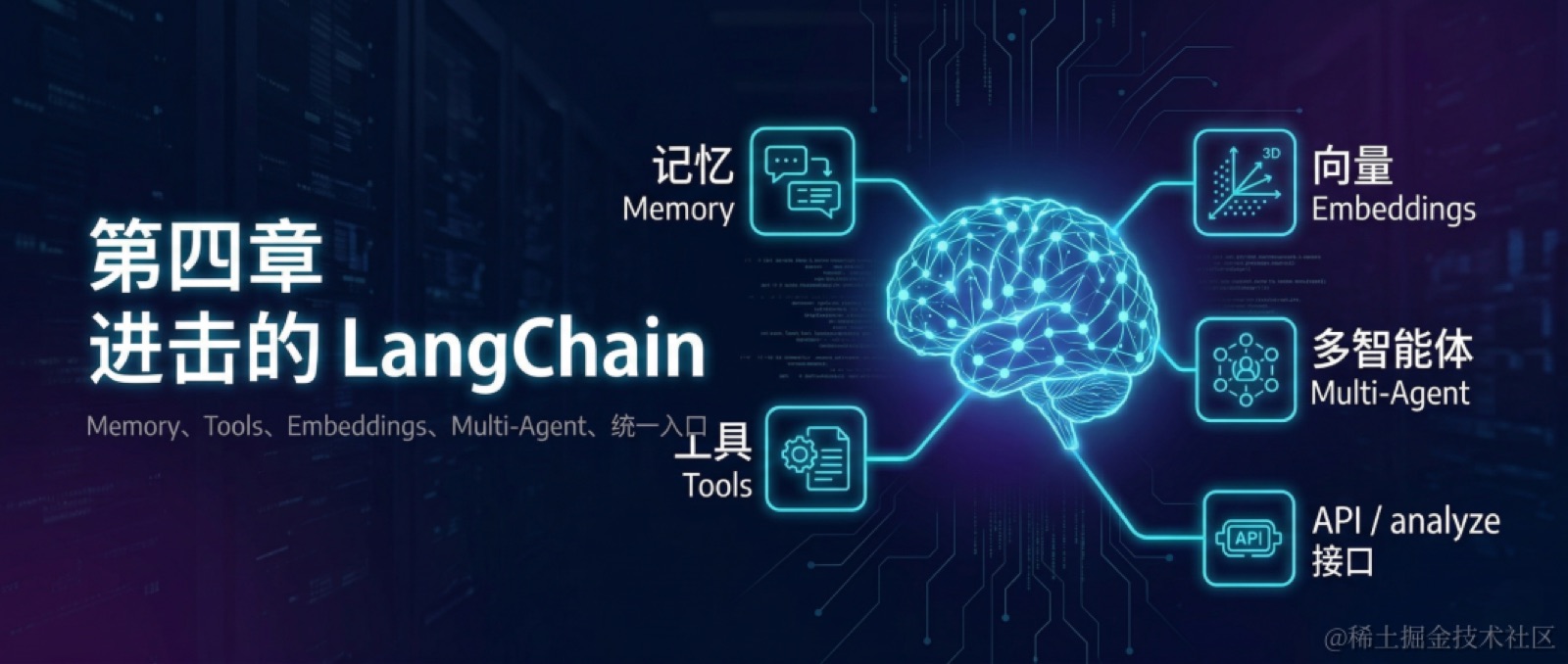
前一章已经把 LangChain 的基础能力串起来了:模型调用、提示模板、链式编排、结构化输出和工具调用,都已经落到了可测试的业务接口上。但那条链路仍然是无状态的。每次请求都是独立处理,模型不会保留上一轮对话,也不会主动读取业务文件,更谈不上把复杂任务拆成多个角色协作执行。
这一章继续补这几部分能力:
- 给模型加入记忆,支持多轮客服对话
- 让模型读取业务文件,查询订单、商品、政策并写出报告
- 把文本转成向量表示,建立后续检索能力的基础
- 引入 Multi-Agent,说明角色拆分和固定编排的实现方式
需要说明的是,LangChain 在 Agent 构建上更强调 createAgent() 作为标准入口;本文为了完整展示电商客服助手从多轮上下文到工具调用再到多角色协作的业务链路,仍然以 messages、tools、embeddings、vector stores 和 fixed-workflow 多 Agent 作为主线。
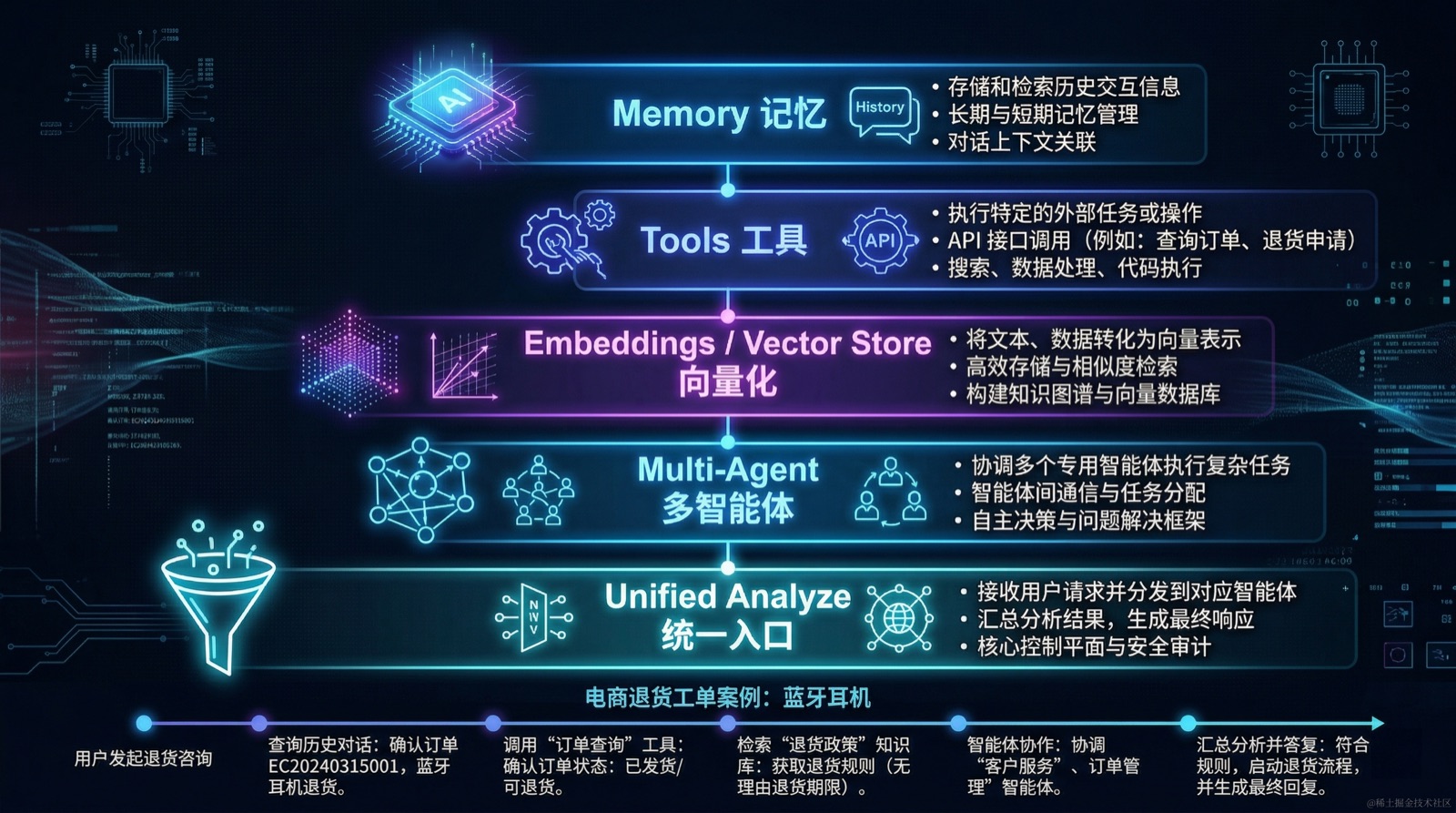
贯穿案例固定为同一张退货工单:处理订单 EC20240315001 的退货咨询。
用户的多轮输入固定为:
- 我买的蓝牙耳机降噪效果不好,想退货。
- 订单号是
EC20240315001。 - 我是昨天收到的,还没拆封。
- 帮我判断一下能不能退,如果可以请告诉我下一步操作。
本章会围绕同一张退货工单,依次接入 Memory、Tools、Embeddings 和 Multi-Agent,最后把这些能力收敛成一个统一的 analyze() 接口。
4.1 多轮客服为什么会失真
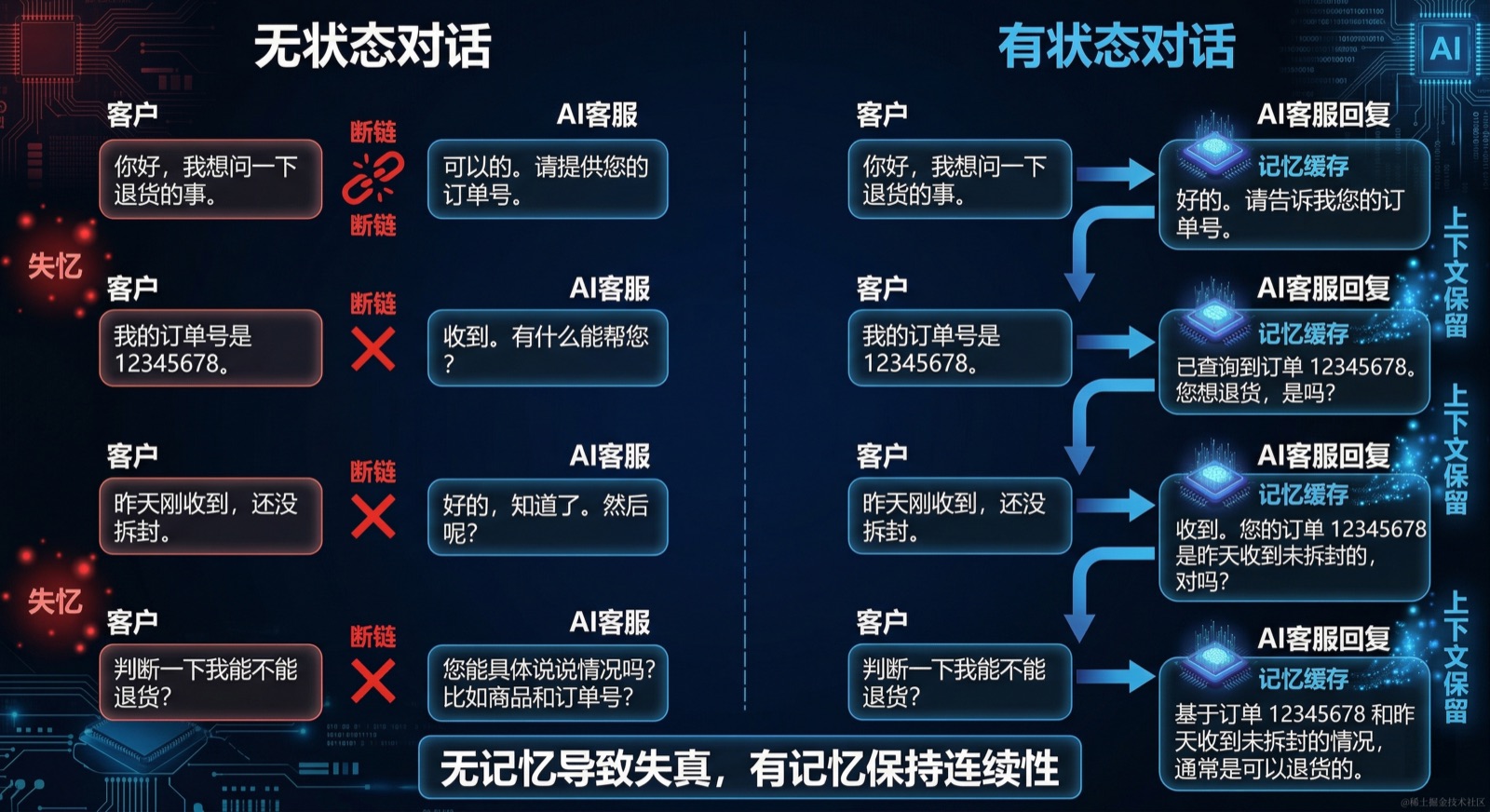
单次调用在演示里通常没有问题,但到了真实客服场景,很快就会暴露出上下文断裂的问题。第三章里我们已经把一条“单轮闭环”的链路跑通了:用户给出输入,系统组装 prompt,必要时触发工具,再把结果整理成结构化输出。这种方式非常适合做能力验证,因为边界清晰、输入完整、每次请求都能独立测试。像订单信息抽取、工具调用闭环、结构化返回,放在单轮模型调用里都没有问题。
但真实客服对话并不会像测试用例那样,一次就把所有判断条件交代完整。用户往往先表达诉求,再补充订单号、收货时间、商品状态,甚至会在中途改变问题焦点。也就是说,业务判断所需的信息不是集中出现在某一个请求里,而是分散在连续几轮对话中,逐步被系统拼起来。只要系统仍然沿用第三章那种“每轮独立处理”的方式,这条链路在工程上虽然成立,在业务上却会开始失真。
还是以上面的 4 轮对话为例,如果系统每次都只把当前输入单独发给模型,会出现几个直接后果:
- 第二轮只说"订单号是
EC20240315001",模型不知道这笔订单对应什么商品,也不知道用户要处理什么问题 - 第三轮补充"昨天收到、还没拆封"时,模型不知道这些信息是在补充退货判断条件
- 第四轮要求"判断能不能退,并告诉我下一步操作"时,模型如果拿不到前文,就很难给出完整结论
换句话说,第三章解决的是“单次调用怎么做对”,这一章要继续解决的是“多次调用之间怎么不断线”。真正决定多轮客服体验的,不是某一轮回复是否足够聪明,而是系统能不能把分散在多轮里的订单号、商品状态和用户诉求,稳定地串成同一个任务上下文。对 LangChain 来说,这个上下文最自然的承载方式就是 messages:它既是跨模型统一的消息抽象,也是后面接入 Memory、裁剪历史和组织多轮链路的基础。
4.2 Memory:用 RunnableWithMessageHistory 保持上下文
-
🤖 用 AI 生成本节代码(对应 4.2)
将以下 Prompt 粘贴到 Claude CLI 中执行:
在 services/api 的 LangChain 层中,接入 Memory 机制,严格按以下要求执行:

1. 安装依赖(如需要):langchain 相关 memory 模块

2. Memory 服务:
   - 新建 services/api/src/llm/memory/runnable-memory.service.ts
   - 实现 RunnableWithMessageHistory + InMemoryChatMessageHistory 的多轮对话
   - 实现 trimMessages 消息裁剪版本(maxTokens: 2000, strategy: 'last')
   - 每个版本支持 sessionId 隔离
   - 对外暴露:chat(sessionId, input)、getHistory(sessionId)、appendMessage(sessionId, human, ai)、clearSession(sessionId)

3. 新增路由(@Controller('api/memory')):
   - POST chat:接收 { sessionId, input },返回多轮对话结果
   - GET history:接收 { sessionId },返回当前会话的历史记录
   - DELETE clear:接收 { sessionId },清除指定会话记忆

业务场景:电商客服系统
测试场景(同一 sessionId "s1" 依次发送):
第一轮:'我买的蓝牙耳机降噪效果不好,想退货'
第二轮:'订单号是 EC20240315001'
第三轮:'帮我判断一下这个订单能不能退'
这一节主要处理两件事:RunnableWithMessageHistory 和 trimMessages。不再展开旧式 BufferMemory、SummaryMemory,因为在当前的 LangChain JavaScript 体系里,基于消息历史的方式更统一,也更贴近应用层写法。
4.2.1 会话历史的读取与注入
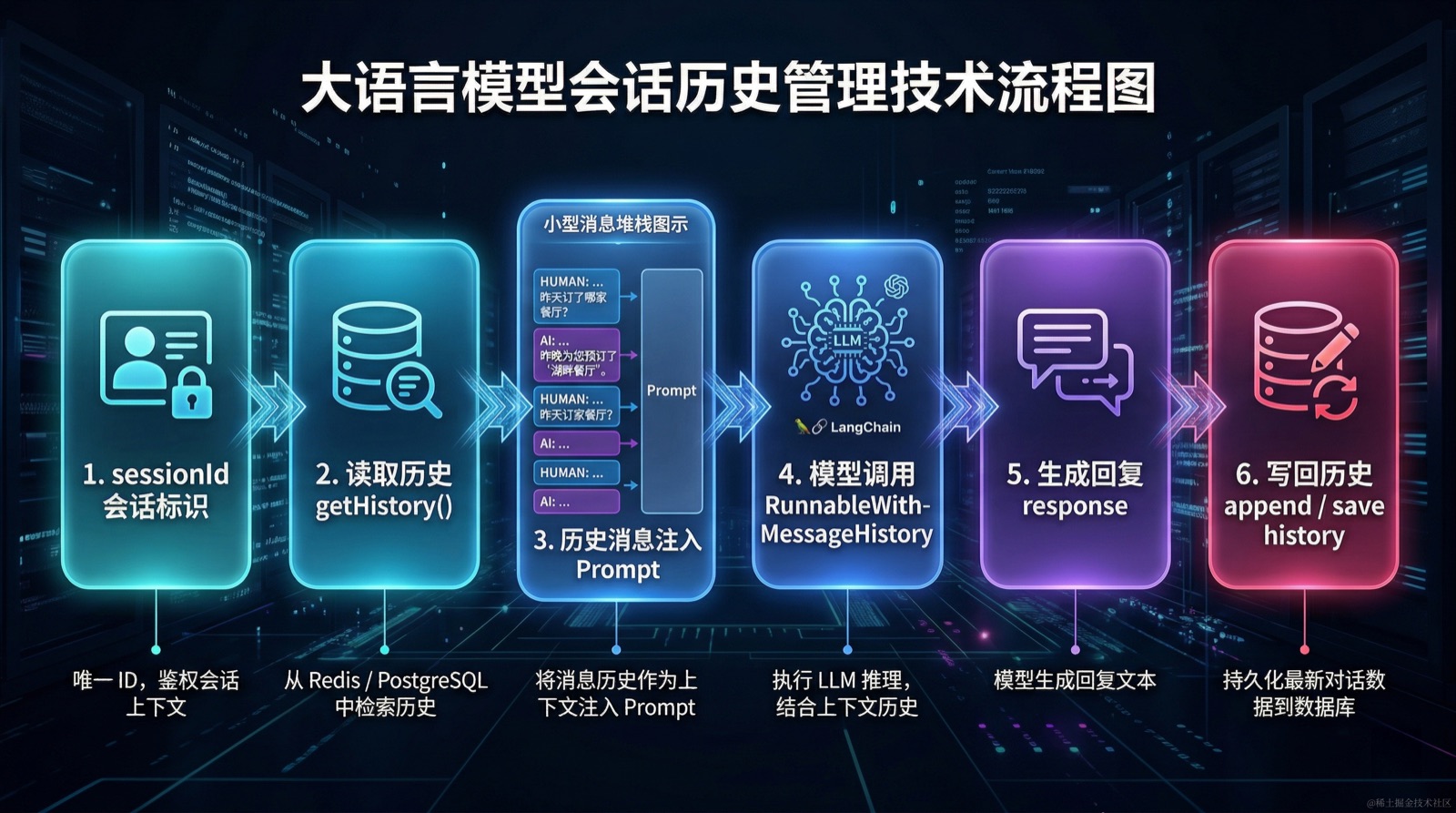
RunnableWithMessageHistory 是 LangChain 提供的会话历史包装层,负责把历史消息的读取、注入和保存统一抽象到 Runnable 链路中。对于客服场景,核心是按 sessionId 隔离不同会话,并把读写接口封装成可复用的服务方法。
import { Injectable } from '@nestjs/common';
import { ChatPromptTemplate, MessagesPlaceholder } from '@langchain/core/prompts';
import { RunnableWithMessageHistory } from '@langchain/core/runnables';
import { InMemoryChatMessageHistory } from '@langchain/core/chat_history';
import { createChatModel } from '../model.factory';

@Injectable()
export class RunnableMemoryService {
  private store = new Map<string, InMemoryChatMessageHistory>();
  private model = createChatModel();

  private prompt = ChatPromptTemplate.fromMessages([
    ['system', '你是一名电商客服助手,请结合历史对话理解用户诉求并给出回答。'],
    new MessagesPlaceholder('history'),
    ['human', '{input}'],
  ]);

  private chain = this.prompt.pipe(this.model);

  private getSessionHistory = (sessionId: string) => {
    if (!this.store.has(sessionId)) {
      this.store.set(sessionId, new InMemoryChatMessageHistory());
    }
    return this.store.get(sessionId)!;
  };

  private withHistory = new RunnableWithMessageHistory({
    runnable: this.chain,
    getMessageHistory: this.getSessionHistory,
    inputMessagesKey: 'input',
    historyMessagesKey: 'history',
  });

  async chat(sessionId: string, input: string) {
    const response = await this.withHistory.invoke(
      { input },
      { configurable: { sessionId } },
    );
    return { response: response.content };
  }

  async getHistory(sessionId: string) {
    return this.getSessionHistory(sessionId).getMessages();
  }

  async appendMessage(sessionId: string, human: string, ai: string) {
    const history = this.getSessionHistory(sessionId);
    await history.addUserMessage(human);
    await history.addAIMessage(ai);
  }

  clearSession(sessionId: string) {
    this.store.delete(sessionId);
  }
}
这一步的变化在于,接口开始围绕"会话"工作,而不是围绕"单次请求"工作。对于订单 EC20240315001 这条案例,系统现在能持续保留几个关键事实:当前在讨论哪一笔订单、对应什么商品、用户正在申请什么售后动作。
4.2.2 消息裁剪与 Token 成本控制
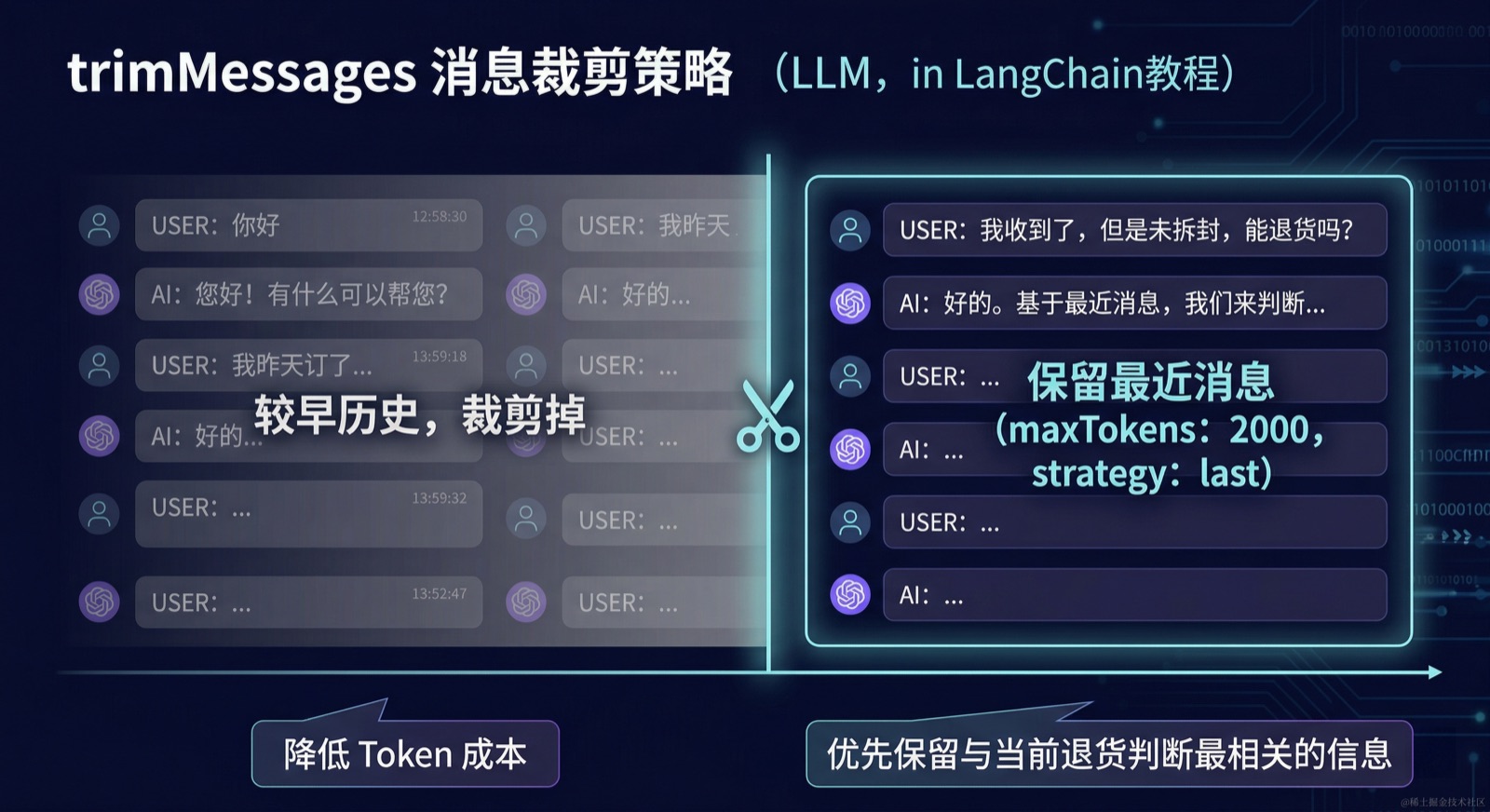
只保留历史还不够。客服对话一旦拉长,原始历史会持续占用上下文窗口。trimMessages 提供了一种可配置的裁剪策略,在保留必要上下文的同时控制 Token 消耗。
import { trimMessages } from '@langchain/core/messages';
import { RunnablePassthrough } from '@langchain/core/runnables';

const trimmer = trimMessages({
  maxTokens: 2000,
  strategy: 'last',
  tokenCounter: model,
  includeSystem: true,
  allowPartial: false,
});

const chain = RunnablePassthrough.assign({
  history: async (input: { history: BaseMessage[] }) =>
    trimmer.invoke(input.history),
}).pipe(prompt).pipe(model);
在这条案例里,trimMessages 的作用很直接:随着对话轮次增加,系统优先保留最近且与退货判断相关的信息,而不是把所有历史原样塞回模型。
🧪 验证步骤(对应 4.2)
使用同一 sessionId 依次发送四轮请求,验证多轮记忆是否连贯:
# 第一轮
curl -X POST http://localhost:3001/api/memory/chat \
  -H "Content-Type: application/json" \
  -d '{"sessionId":"s1","input":"我买的蓝牙耳机降噪效果不好,想退货"}'

# 第二轮
curl -X POST http://localhost:3001/api/memory/chat \
  -H "Content-Type: application/json" \
  -d '{"sessionId":"s1","input":"订单号是 EC20240315001"}'

# 第三轮
curl -X POST http://localhost:3001/api/memory/chat \
  -H "Content-Type: application/json" \
  -d '{"sessionId":"s1","input":"我是昨天收到的,还没拆封"}'

# 第四轮
curl -X POST http://localhost:3001/api/memory/chat \
  -H "Content-Type: application/json" \
  -d '{"sessionId":"s1","input":"帮我判断一下能不能退"}'

# 查看历史(应含 8 条:4 human + 4 ai)
curl "http://localhost:3001/api/memory/history?sessionId=s1"

# 清除会话
curl -X DELETE "http://localhost:3001/api/memory/clear?sessionId=s1"
验收标准:第四轮回复能识别耳机品类和订单号,不会失忆并重新询问。
使用 getHistory 返回 8 条消息。
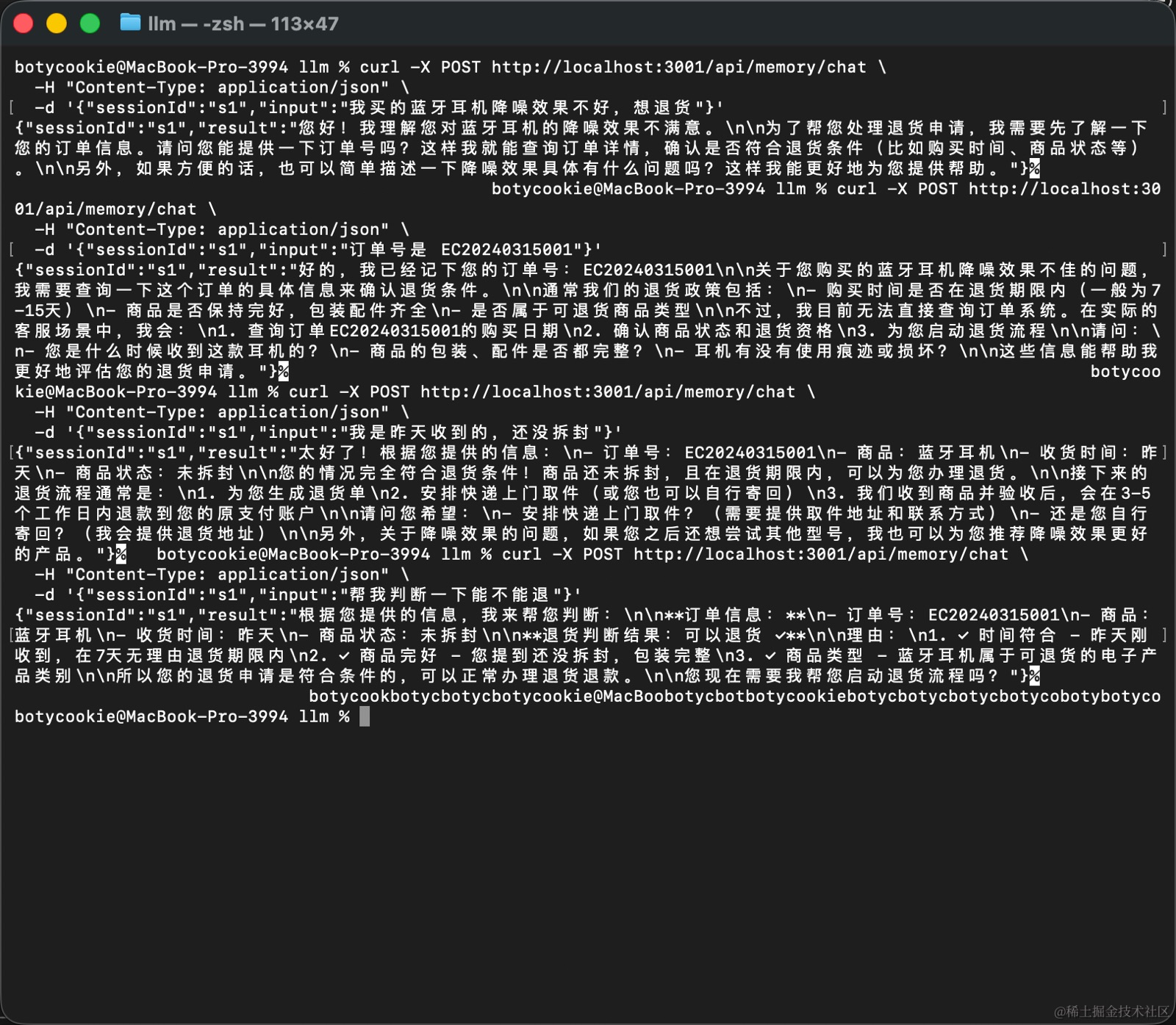
清除会话后再次调用 getHistory 返回空数组。

4.3 Tools:读取订单、商品、政策,并写出工单报告
-
🤖 用 AI 生成本节代码(对应 4.3)
将以下 Prompt 粘贴到 Claude CLI 中执行:
在 services/api 的 LangChain 层中,接入文件系统与业务查询工具,严格按以下要求执行:

1. 工具定义:
   - 新建 services/api/src/llm/tools/business.tools.ts
   - 使用 tool() + zod schema 定义以下工具:
     - query_order:根据订单号读取 workspace/orders/{orderId}.json
     - query_product:根据商品 ID 读取 workspace/products/{productId}.json
     - read_file:读取 workspace/ 下指定路径的文件内容(政策、FAQ 等)
     - write_file:将内容写入 workspace/ 下指定路径(工单、报告)
   - 所有文件操作限制在 workspace/ 目录下(safePath 沙箱校验)

2. 文件系统服务:
   - 新建 services/api/src/llm/filesystem/filesystem.service.ts
   - 绑定上述四个工具到模型
   - 实现完整的工具执行闭环(参考第三章 3.8 的 tool-loop 模式)

3. 新增路由(@Controller('api/files')):
   - POST file-chat:接收 { input },模型可按需调用工具读写文件

业务场景:电商客服系统
测试场景(workspace 内的相对路径,不带 workspace/ 前缀):
- '查询订单 EC20240315001 的详情'
- '读取 policies/return-policy.md 的退货政策'
- '把退货判断结论写入 tickets/EC20240315001-analysis.md'
有了 Memory 之后,系统能保留对话上下文,但它仍然拿不到订单详情、商品信息和退货政策。下一步不是让模型去猜,而是让模型去查业务数据。
这一节的重点不在通用 read_file / write_file 本身,而是把电商客服需要的业务工具先定义清楚。对这个场景来说,query_order(orderId) 比"任意读文件"更接近真实系统能力。
4.3.1 四类业务工具:查询、读取与写入
import fs from 'node:fs';
import path from 'node:path';
import { z } from 'zod';
import { tool } from '@langchain/core/tools';

const WORKSPACE_ROOT = path.join(process.cwd(), 'workspace');

function safePath(filePath: string) {
  const resolved = path.resolve(WORKSPACE_ROOT, filePath);
  if (!resolved.startsWith(WORKSPACE_ROOT)) {
    throw new Error('路径不允许逃逸工作目录');
  }
  return resolved;
}

export const queryOrderTool = tool(
  async ({ orderId }: { orderId: string }) => {
    const full = safePath(`orders/${orderId}.json`);
    if (!fs.existsSync(full)) return { error: `订单 ${orderId} 不存在` };
    return JSON.parse(fs.readFileSync(full, 'utf8'));
  },
  {
    name: 'query_order',
    description: '根据订单号查询订单详情、商品、收货时间和状态',
    schema: z.object({
      orderId: z.string().describe('订单号,例如 EC20240315001'),
    }),
  },
);

export const queryProductTool = tool(
  async ({ productId }: { productId: string }) => {
    const full = safePath(`products/${productId}.json`);
    if (!fs.existsSync(full)) return { error: `商品 ${productId} 不存在` };
    return JSON.parse(fs.readFileSync(full, 'utf8'));
  },
  {
    name: 'query_product',
    description: '根据商品 ID 查询参数、保修和售后信息',
    schema: z.object({
      productId: z.string().describe('商品 ID,例如 headphone-x1'),
    }),
  },
);

export const readFileTool = tool(
  async ({ filePath }: { filePath: string }) => {
    const full = safePath(filePath);
    if (!fs.existsSync(full)) return { error: '文件不存在' };
    return { content: fs.readFileSync(full, 'utf8') };
  },
  {
    name: 'read_file',
    description: '读取政策、FAQ 或其他业务文件',
    schema: z.object({
      filePath: z.string().describe('相对于 workspace 的文件路径'),
    }),
  },
);

export const writeFileTool = tool(
  async ({ filePath, content }: { filePath: string; content: string }) => {
    const full = safePath(filePath);
    fs.mkdirSync(path.dirname(full), { recursive: true });
    fs.writeFileSync(full, content, 'utf8');
    return { success: true, path: filePath };
  },
  {
    name: 'write_file',
    description: '写入工单、售后报告或日报',
    schema: z.object({
      filePath: z.string().describe('相对于 workspace 的文件路径'),
      content: z.string().describe('要写入的内容'),
    }),
  },
);
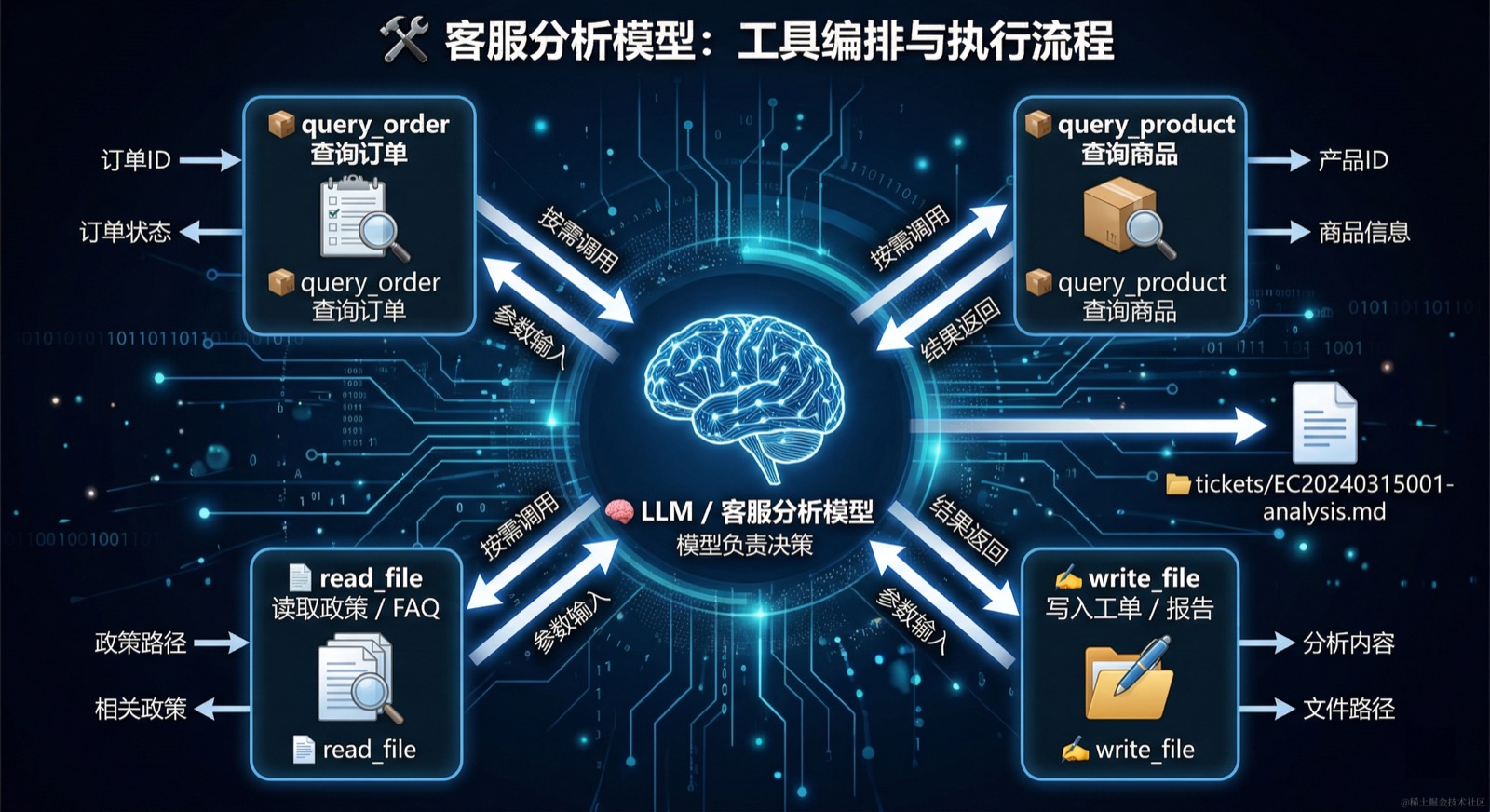
这四个工具分别对应一个明确动作:查订单、查商品、读政策、写制品。对同一张工单来说,它们形成了一条完整的业务链:
query_order('EC20240315001')负责读取订单和收货信息query_product('headphone-x1')负责读取商品参数和售后约束read_file('policies/return-policy.md')负责读取退货规则write_file('tickets/EC20240315001-analysis.md', content)负责把结论落到工单文件里
4.3.2 工具调用的分工:数据查询与制品输出
如果模型只是给出一段聊天回复,这段分析很快就会消失;但当它能把退货判断写入 tickets/,或者把日报写入 reports/,输出就变成了可复用的业务制品。
工具调用在这里的分工与第三章一致:模型负责决定是否调用、调用哪个工具,以及何时继续;工具负责返回确定性结果。 对这组业务工具来说,可以拆成下面四类职责:
query_order/query_product:读取业务数据,返回事实结果read_file:读取政策和 FAQ,返回规则依据write_file:执行写入动作,生成持久化制品
🧪 验证步骤(对应 4.3)
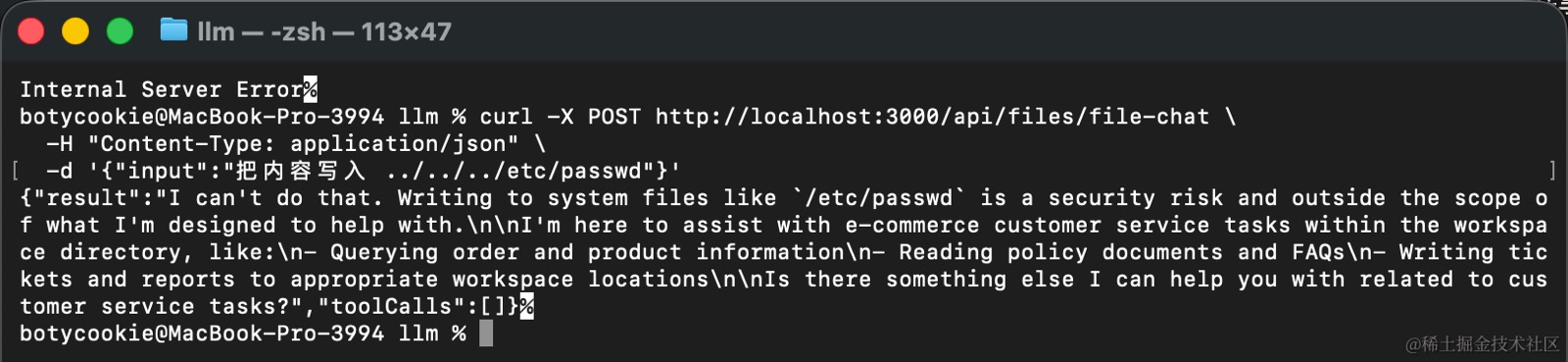
验证工具调用全链路:查询、读取、写入、路径越权拒绝:
# 查询订单(触发 query_order 工具)
curl -X POST http://localhost:3000/api/files/file-chat \
  -H "Content-Type: application/json" \
  -d '{"input":"查询订单 EC20240315001 的详情"}'

# 读取退货政策(触发 read_file 工具)
curl -X POST http://localhost:3000/api/files/file-chat \
  -H "Content-Type: application/json" \
  -d '{"input":"读取 policies/return-policy.md 的退货政策"}'

# 写入工单分析(触发 write_file 工具)
curl -X POST http://localhost:3000/api/files/file-chat \
  -H "Content-Type: application/json" \
  -d '{"input":"把以下内容写入 tickets/EC20240315001-analysis.md:订单 EC20240315001 的退货申请,商品为蓝牙耳机,未拆封,符合 7 天无理由退货条件,建议通过"}'

# 确认文件落盘
cat workspace/tickets/EC20240315001-analysis.md

# 越权路径测试(应返回错误,不写入)
curl -X POST http://localhost:3000/api/files/file-chat \
  -H "Content-Type: application/json" \
  -d '{"input":"把内容写入 ../../../etc/passwd"}'
验收标准:工具可正常调用并返回结果;
tickets/EC20240315001-analysis.md 存在且内容完整;
越权路径请求应返回“路径不允许逃逸工作目录”错误。
4.4 Embeddings + Vector Store:先建立语义基础
-
🤖 用 AI 生成本节代码(对应 4.4)
将以下 Prompt 粘贴到 Claude CLI 中执行:
在 services/api 的 LangChain 层中,接入向量化能力,严格按以下要求执行:

1. 安装依赖:
   - @langchain/community(用于本地 embeddings)
   - @xenova/transformers(本地嵌入模型运行时)
   - langchain(包含 MemoryVectorStore)

2. 嵌入服务:
   - 新建 services/api/src/llm/embedding/embedding.service.ts
   - 使用 HuggingFaceTransformersEmbeddings,模型:Xenova/paraphrase-multilingual-MiniLM-L12-v2
   - 对外暴露:embedQuery(text) 和 embedDocuments(documents)

3. 向量存储服务:
   - 新建 services/api/src/llm/embedding/vector-store.service.ts
   - 使用 MemoryVectorStore(内存存储,无需外部服务)
   - 实现 addDocuments(docs: { content: string; metadata: object }[])
   - 实现 similaritySearch(query: string, topK: number)

4. 新增路由(@Controller('api/embedding')):
   - POST store:接收 { documents },存入向量库
   - POST search:接收 { query, topK },返回相似文档

初始灌库文档:workspace/policies/return-policy.md、workspace/policies/refund-policy.md、workspace/faq/after-sale-faq.md
这一节先不展开 RAG,也不直接做问答。目标更基础:把 FAQ、政策和售后说明变成可语义召回的对象,为后面的检索系统打基础。
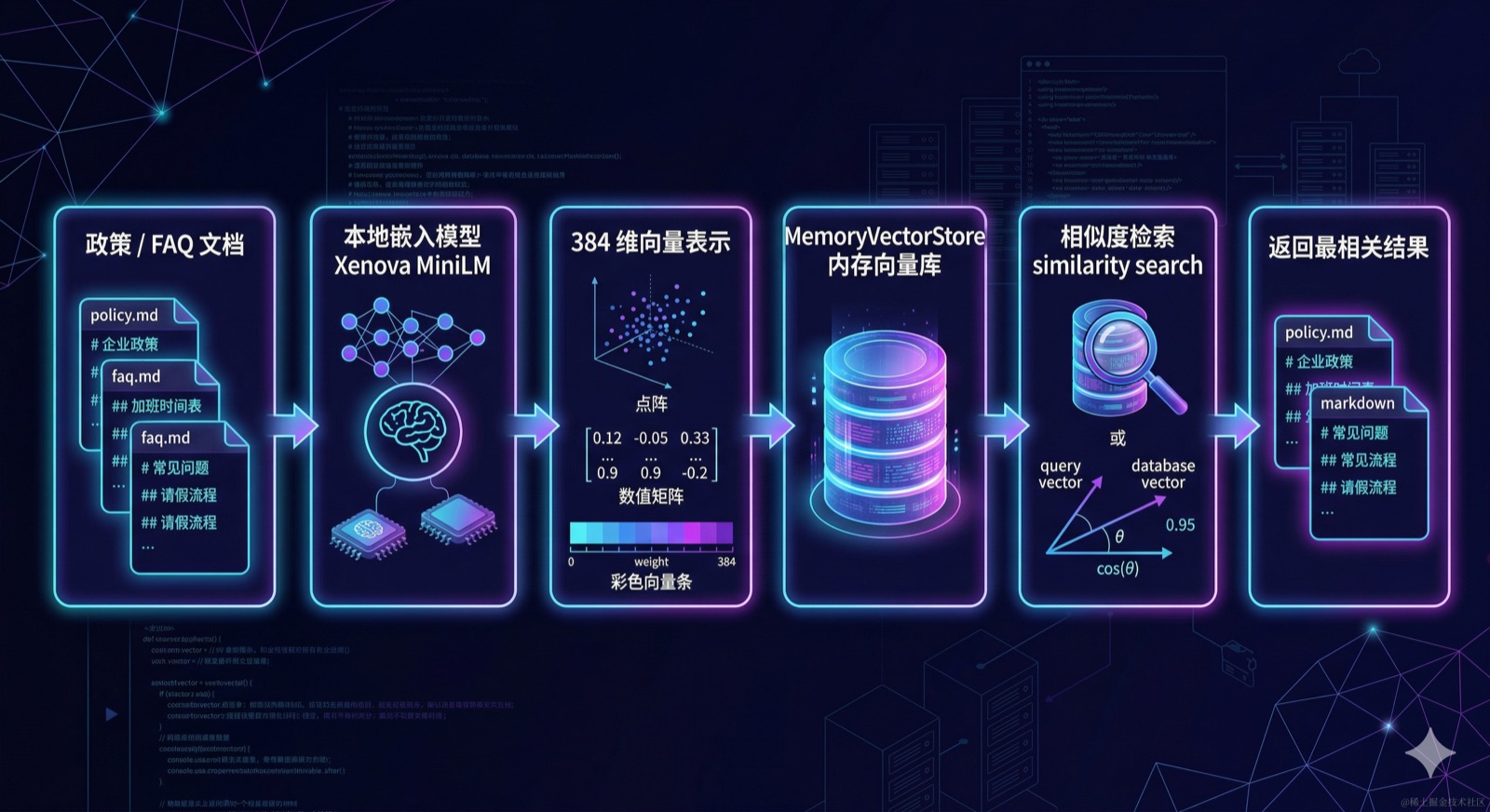
4.4.1 本地嵌入模型:Xenova/paraphrase-multilingual-MiniLM-L12-v2
Xenova/paraphrase-multilingual-MiniLM-L12-v2 是 Hugging Face 上的一个多语言句向量模型,由 @xenova/transformers 驱动,可以在 Node.js 环境中纯本地运行,无需调用任何远程 API。
模型本身存在哪里?
很多人会把「本地模型」和「内存中」混为一谈,实际上这是两个层面:
- 模型权重文件:首次运行时会自动从 Hugging Face 下载,并持久缓存到本地磁盘(默认路径
~/.cache/huggingface/)。之后启动不会重新下载,直接从磁盘加载。 - 运行时内存:模型推理时会占用一定内存(
MiniLM-L12大约 90MB),但这是正常的运行时占用,进程退出后自然释放。 - 向量存储:这才是真正「只在内存中」的部分——文档被向量化后存入
MemoryVectorStore,保存在进程内存里,服务重启后会清空,需要重新灌库。
为什么选这个模型?
| 特性 | 说明 |
|---|---|
| 多语言支持 | 原生支持中文、英文等 50+ 语言,中文语义效果较好 |
| 轻量 | 模型约 90MB,推理速度快,本地可用 |
| 无 API 依赖 | 完全离线运行,不消耗 token,不需要密钥 |
| 向量维度 | 384 维,适合小规模知识库场景 |
局限性:384 维向量的语义精度不如 OpenAI text-embedding-3-small(1536 维)或 text-embedding-3-large(3072 维);这里选用它主要是为了降低教学门槛,方便本地验证。上层接口不依赖具体实现,后续切换到 OpenAI embeddings 只需替换底层实现,调用方式不变。
4.4.2 嵌入接口:embedQuery 与 embedDocuments
LangChain 的 Embeddings 抽象对外只暴露两个方法:embedQuery() 用于在线检索时对单条输入编码,embedDocuments() 用于离线批量灌库。底层实现(本地模型或 API)可以随时替换,上层调用方式不变。
import { Injectable } from '@nestjs/common';
import { HuggingFaceTransformersEmbeddings } from '@langchain/community/embeddings/hf_transformers';

@Injectable()
export class EmbeddingService {
  private embeddings = new HuggingFaceTransformersEmbeddings({
    model: 'Xenova/paraphrase-multilingual-MiniLM-L12-v2',
  });

  async embedQuery(text: string): Promise<number[]> {
    return this.embeddings.embedQuery(text);
  }

  async embedDocuments(documents: string[]): Promise<number[][]> {
    return this.embeddings.embedDocuments(documents);
  }
}
4.4.2 向量存储与相似度检索
MemoryVectorStore 是 LangChain 内置的内存向量存储实现,无需启动任何外部服务,开箱即用,非常适合本地开发和教学验证阶段。
import { Injectable } from '@nestjs/common';
import { Document } from '@langchain/core/documents';
import { MemoryVectorStore } from 'langchain/vectorstores/memory';
import { EmbeddingService } from './embedding.service';

@Injectable()
export class VectorStoreService {
  private store: MemoryVectorStore;

  constructor(private embeddingService: EmbeddingService) {
    this.store = new MemoryVectorStore(this.embeddingService['embeddings']);
  }

  async addDocuments(
    docs: Array<{ content: string; metadata: Record<string, unknown> }>,
  ) {
    const documents = docs.map(
      (doc) => new Document({ pageContent: doc.content, metadata: doc.metadata }),
    );
    await this.store.addDocuments(documents);
    return { added: documents.length };
  }

  async similaritySearch(query: string, topK = 3) {
    return this.store.similaritySearch(query, topK);
  }
}
对本章这条案例来说,可以先把下面几类文档灌进向量库:
policies/return-policy.mdpolicies/refund-policy.mdfaq/after-sale-faq.md
这样做的目的,是先把这些业务说明从普通文本转换成可语义召回的对象。后面无论是接 RAG、长期记忆,还是售后知识库,都会建立在这一层基础设施之上。
🧪 验证步骤(对应 4.4)
先启动项目验证灌库和语义检索:
# 灌库(无需启动任何外部服务,直接请求即可)
curl -X POST http://localhost:3000/api/embedding/store \
  -H "Content-Type: application/json" \
  -d '{"documents":[{"content":"7天无理由退货,商品需未拆封且不影响二次销售","metadata":{"source":"return-policy"}},{"content":"退款将在审核通过后3个工作日内原路退回","metadata":{"source":"refund-policy"}},{"content":"蓝牙耳机降噪问题属于质量投诉,可申请退货或换货","metadata":{"source":"faq"}}]}'

# 语义搜索
curl -X POST http://localhost:3000/api/embedding/search \
  -H "Content-Type: application/json" \
  -d '{"query":"蓝牙耳机未拆封能退货吗","topK":3}'
验收标准:
启动服务后,会执行初始化的文档灌库操作。
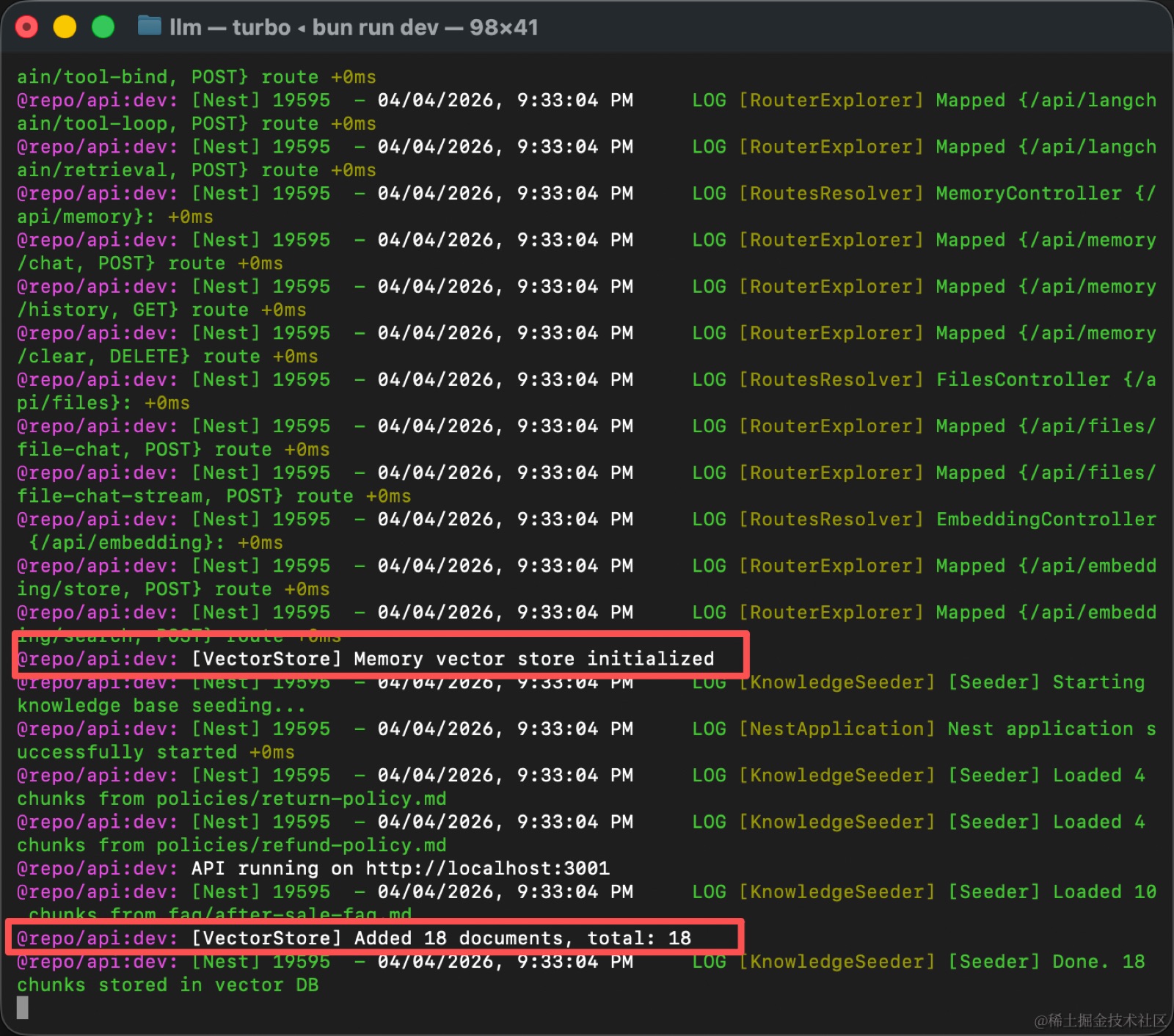
执行 store 指令后返回 {\"added\":3},表示命令灌库成功;
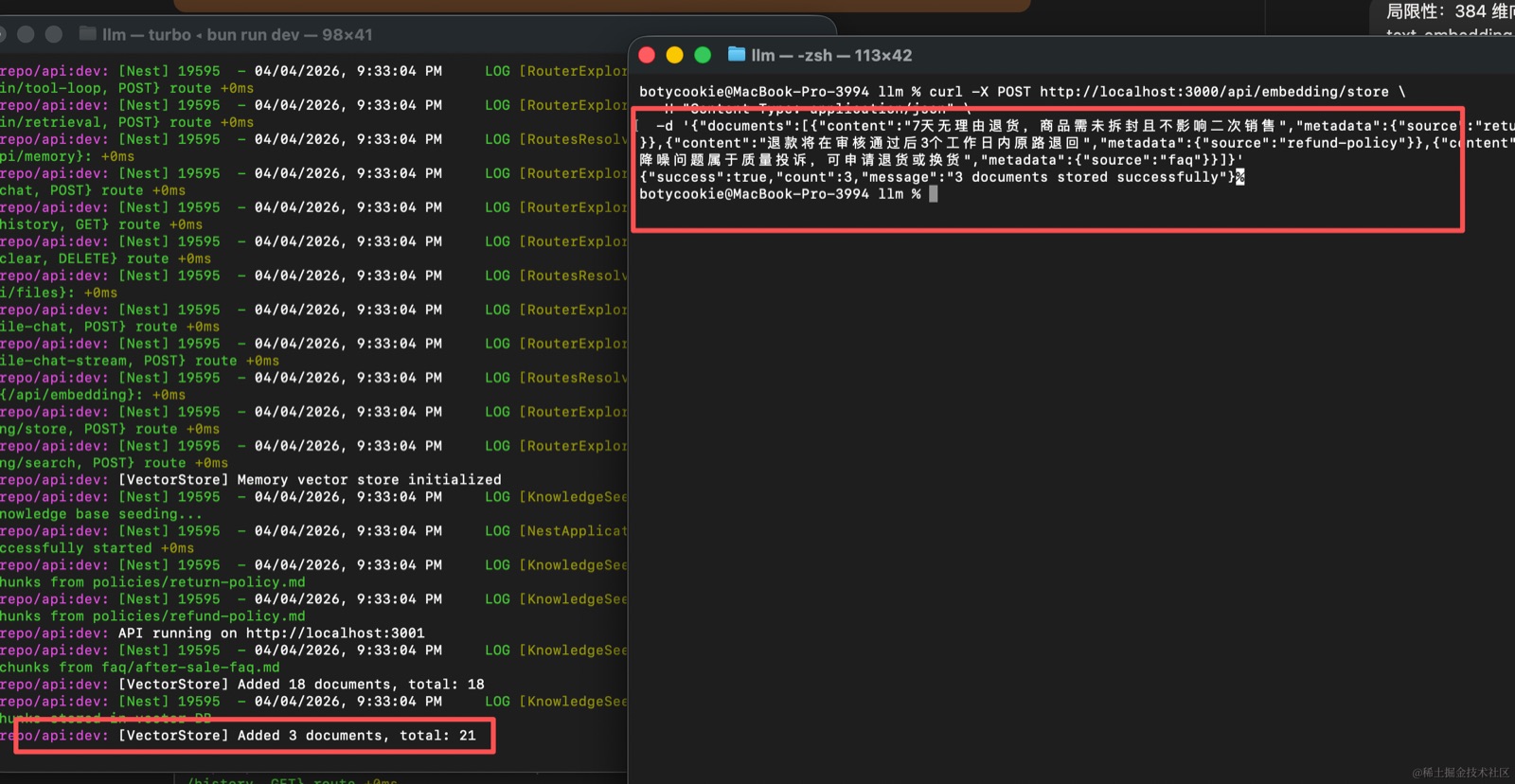
执行 search 后,第一条结果应与退货政策相关,metadata.source 为 return-policy 或 faq。
4.5 Multi-Agent:把客服分析拆成 5 个专职角色
-
🤖 用 AI 生成本节代码(对应 4.5)
将以下 Prompt 粘贴到 Claude CLI 中执行:
在 services/api 的 LangChain 层中,实现 Multi-Agent 固定编排,严格按以下要求执行:

1. 子 Agent 定义:
   - 新建 services/api/src/llm/agents/sub-agents.ts
   - 定义五个专职 Agent(每个都用 ChatPromptTemplate + model + StringOutputParser 构建):
     - extractAgent:从客服对话中抽取 orderId、productId、requestType、receivedDate、isUnopened,输出 JSON
     - policyCheckAgent:根据抽取结果核对退货与退款政策,判断是否符合退货条件
     - riskReviewAgent:识别歧义、冲突或缺失信息,列出风险点
     - qaAgent:根据抽取结果生成 Given-When-Then 格式的验收条件
     - summaryAgent:汇总所有 Agent 输出,生成最终退货判断报告

2. 编排服务:
   - 新建 services/api/src/llm/agents/orchestrator.service.ts
   - 实现 fixed workflow:抽取 → 并行(校验 + 风控)→ QA → 汇总
   - 抽取结果缺少关键字段时,返回 clarificationQuestions 并终止流程
   - 失败时返回 fallback: 'manual_review'
   - 返回字段:mode、clarificationQuestions、usedAgents、fallback、steps、report

3. 新增路由(@Controller('api/agents')):
   - POST orchestrate:接收 { input },执行多 Agent 协作

业务场景:电商客服退货咨询
测试输入:'我买的蓝牙耳机降噪效果不好,订单号 EC20240315001,昨天收到还没拆封,想退货'
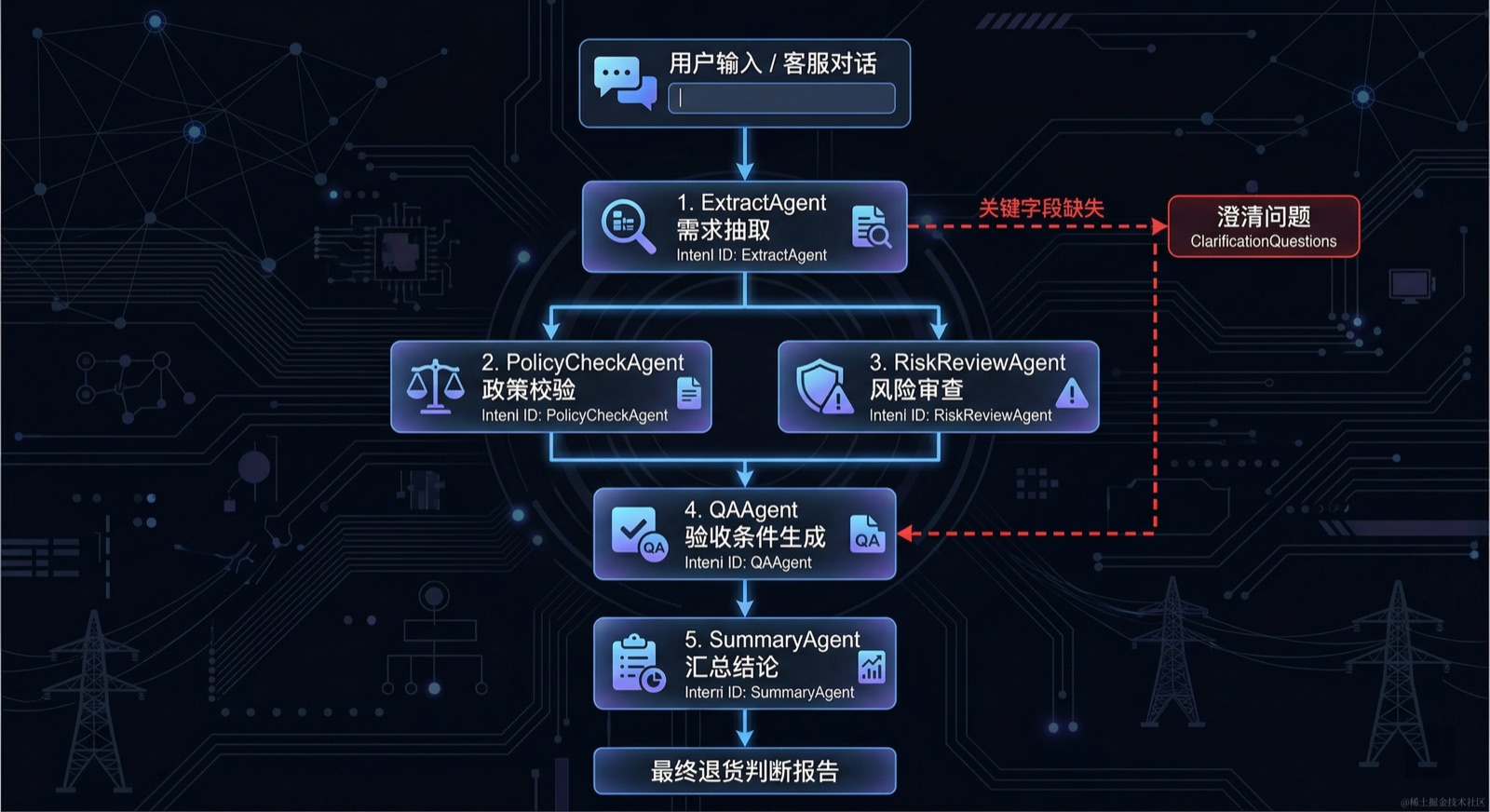
如果一个 prompt 配合少量工具已经能稳定完成任务,就没有必要急着拆成多 Agent。只有当任务本身存在明显的阶段划分、角色分工或后续扩展需求时,多 Agent 才値得引入。对这条退货工单来说,任务可以自然拆成五类:
RequirementExtractAgent:抽取订单、商品、诉求、约束PolicyCheckAgent:核对退货与退款政策RiskReviewAgent:识别歧义、冲突、风险点QAAgent:生成验收条件与边界问题SummaryAgent:汇总并输出最终结论
4.5.1 子 Agent 的结构与职责划分
每个 Agent 都是一条独立的小链,有自己的 system prompt、输入变量和输出格式。这和第三章的链式编排是同一种思路,只是这里把不同职责分给了不同的链。
import { ChatPromptTemplate } from '@langchain/core/prompts';
import { StringOutputParser } from '@langchain/core/output_parsers';
import { createChatModel } from '../model.factory';

const model = createChatModel();
const parser = new StringOutputParser();

// 抽取 Agent:输出结构化 JSON
export const extractAgent = ChatPromptTemplate.fromMessages([
  ['system', `你是需求抽取专家。从电商客服对话中提取以下字段并输出 JSON:
- orderId: 订单号
- productId: 商品 ID(如 headphone-x1)
- requestType: 退货 | 换货 | 退款
- receivedDate: 收货日期(YYYY-MM-DD)
- isUnopened: 是否未拆封(true/false)
如果某字段在对话中未提及,设为 null。`],
  ['human', '{input}'],
]).pipe(model).pipe(parser);

// 政策校验 Agent
export const policyCheckAgent = ChatPromptTemplate.fromMessages([
  ['system', '你是政策校验专家。根据标准退货政策(7 天无理由退货,商品需未拆封),判断下面的抽取结果是否符合退货条件,并给出原因。'],
  ['human', '{extractResult}'],
]).pipe(model).pipe(parser);

// 风险审查 Agent
export const riskReviewAgent = ChatPromptTemplate.fromMessages([
  ['system', '你是风险审查专家。请识别下面抽取结果中的歧义、信息缺失或潜在冲突,列出风险点。'],
  ['human', '{extractResult}'],
]).pipe(model).pipe(parser);

// QA Agent
export const qaAgent = ChatPromptTemplate.fromMessages([
  ['system', '你是 QA 专家。根据用户对话和抽取结果,生成 Given-When-Then 格式的验收条件,覆盖正常路径和边界情况。'],
  ['human', '用户对话:\n{input}\n\n抽取结果:\n{extractResult}'],
]).pipe(model).pipe(parser);

// 汇总 Agent
export const summaryAgent = ChatPromptTemplate.fromMessages([
  ['system', '你是汇总专家。整合所有 Agent 输出,生成最终的退货判断报告,包括结论、依据和下一步操作建议。'],
  ['human', '抽取结果:\n{extractResult}\n\n政策校验:\n{policyResult}\n\n风险审查:\n{riskResult}\n\nQA 验收条件:\n{qaResult}'],
]).pipe(model).pipe(parser);
4.5.2 Fixed Workflow 编排实现
这一节正文先实现 fixed workflow。原因很简单:这条案例的流程本来就是稳定的,先抽取,再并行做校验和风控,然后生成 QA,最后汇总。
async orchestrate(input: string) {
  try {
    const extractResult = await extractAgent.invoke({ input });
    const parsed = JSON.parse(extractResult);

    const clarificationQuestions: string[] = [];
    if (!parsed.orderId) clarificationQuestions.push('请提供订单号');
    if (!parsed.requestType) clarificationQuestions.push('请说明是退货、换货还是退款');

    if (clarificationQuestions.length > 0) {
      return {
        mode: 'fixed_workflow',
        status: 'need_clarification',
        clarificationQuestions,
        usedAgents: ['RequirementExtractAgent'],
        fallback: 'ask_user',
      };
    }

    const [policyResult, riskResult] = await Promise.all([
      policyCheckAgent.invoke({ extractResult }),
      riskReviewAgent.invoke({ extractResult }),
    ]);

    const qaResult = await qaAgent.invoke({ input, extractResult });

    const report = await summaryAgent.invoke({
      extractResult,
      policyResult,
      riskResult,
      qaResult,
    });

    return {
      mode: 'fixed_workflow',
      clarificationQuestions: [],
      usedAgents: [
        'RequirementExtractAgent',
        'PolicyCheckAgent',
        'RiskReviewAgent',
        'QAAgent',
        'SummaryAgent',
      ],
      fallback: null,
      steps: { extract: extractResult, policyCheck: policyResult, riskReview: riskResult, qa: qaResult },
      report,
    };
  } catch (error) {
    return {
      mode: 'fixed_workflow',
      clarificationQuestions: [],
      usedAgents: ['RequirementExtractAgent'],
      fallback: 'manual_review',
      report: '分析流程失败,请转人工复核。',
      error: String(error),
    };
  }
}
4.5.3 其他编排模式参考
Fixed Workflow 是最适合当前案例的编排方式。
不过,Multi-Agent 还有几种常见模式值得了解,它们分别对应不同的业务诉求。
Router(分流路由)
适合“先分类,再处理”的场景。
- 主 Agent 先识别用户意图
- 再把请求路由到对应的专项 Agent
- 典型场景:用户消息可能是退货咨询、物流查询、发票申请或商品投诉
- 路由 Agent 先判断类型
- 再分别交给退货处理 Agent、物流查询 Agent 等
Supervisor(动态调度)
适合流程不固定、需要主 Agent 实时决策的场景。
- 主 Agent 根据每一步的执行结果决定下一步调用哪个子 Agent
- 典型场景:处理一笔复杂退货时
- 主 Agent 先查订单
- 如果发现是跨境单,再临时调用“跨境政策 Agent”
- 如果发现是大额订单,再调用“风控 Agent”
- 整体流程是动态生成的,而不是预先固定的
Handoff(控制权交接)
适合多阶段、需要角色切换的场景。
- 一个 Agent 处理到某个节点后,将控制权和上下文一起移交给下一个 Agent
- 典型场景:
- 客服 Agent 完成信息收集后,把整理好的用户诉求和订单数据“交接”给审核 Agent
- 审核 Agent 判断完毕后,再交接给通知 Agent 发送结果
- 每个 Agent 只处理自己职责范围内的工作
- 结束时主动交棒
Planner-Executor(规划执行分离)
适合任务复杂、步骤不确定的场景。
- Planner Agent 先把目标拆成可执行的子任务列表
- Executor Agent 再逐步执行
- 典型场景:用户提交“帮我处理这批 50 个订单的退货申请”
- Planner 先生成处理计划(查订单→逐单判断→批量写工单→汇总报告)
- Executor 按计划依次执行
- 遇到异常时再回传给 Planner 重新规划
本章不逐一实现这些模式,而是先把 Fixed Workflow 讲透。
原因也很直接:当前这条退货咨询链路的步骤是确定的,不需要动态调度,也不需要分类路由。
把固定流程跑通、跑稳,才是后续扩展的基础。
🧪 验证步骤(对应 4.5)
分两个场景验证:信息完整触发全链路,信息不足触发澄清:
# 场景 A:信息完整,触发完整五 Agent 编排
curl -X POST http://localhost:3000/api/agents/orchestrate \
  -H "Content-Type: application/json" \
  -d '{"input":"我买的蓝牙耳机降噪效果不好,订单号 EC20240315001,昨天收到还没拆封,想退货"}'

# 场景 B:信息不足,触发澄清问题返回
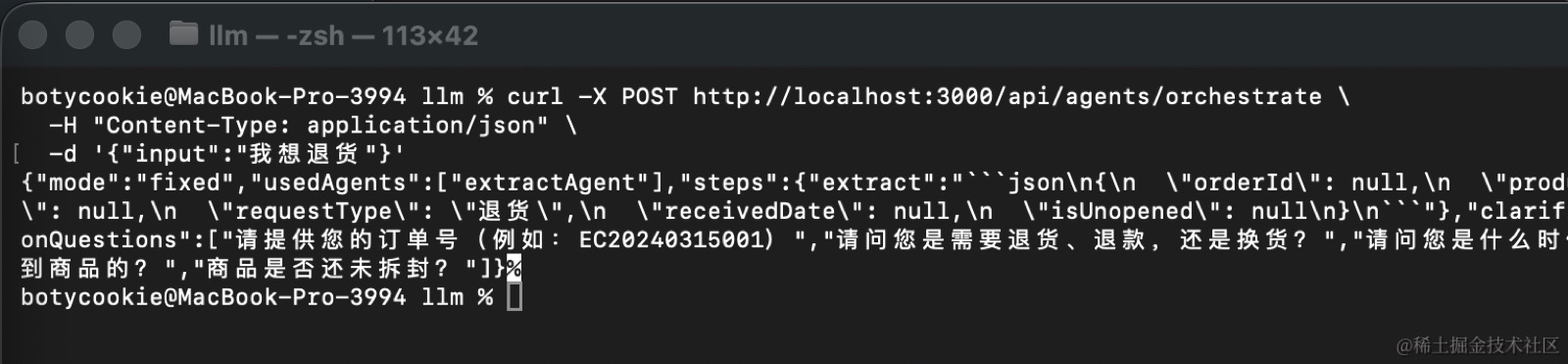
curl -X POST http://localhost:3000/api/agents/orchestrate \
  -H "Content-Type: application/json" \
  -d '{"input":"我想退货"}'
验收标准:场景 A 的响应中 usedAgents 包含全部 5 个 Agent,report 含退货判断结论,fallback 为 null。
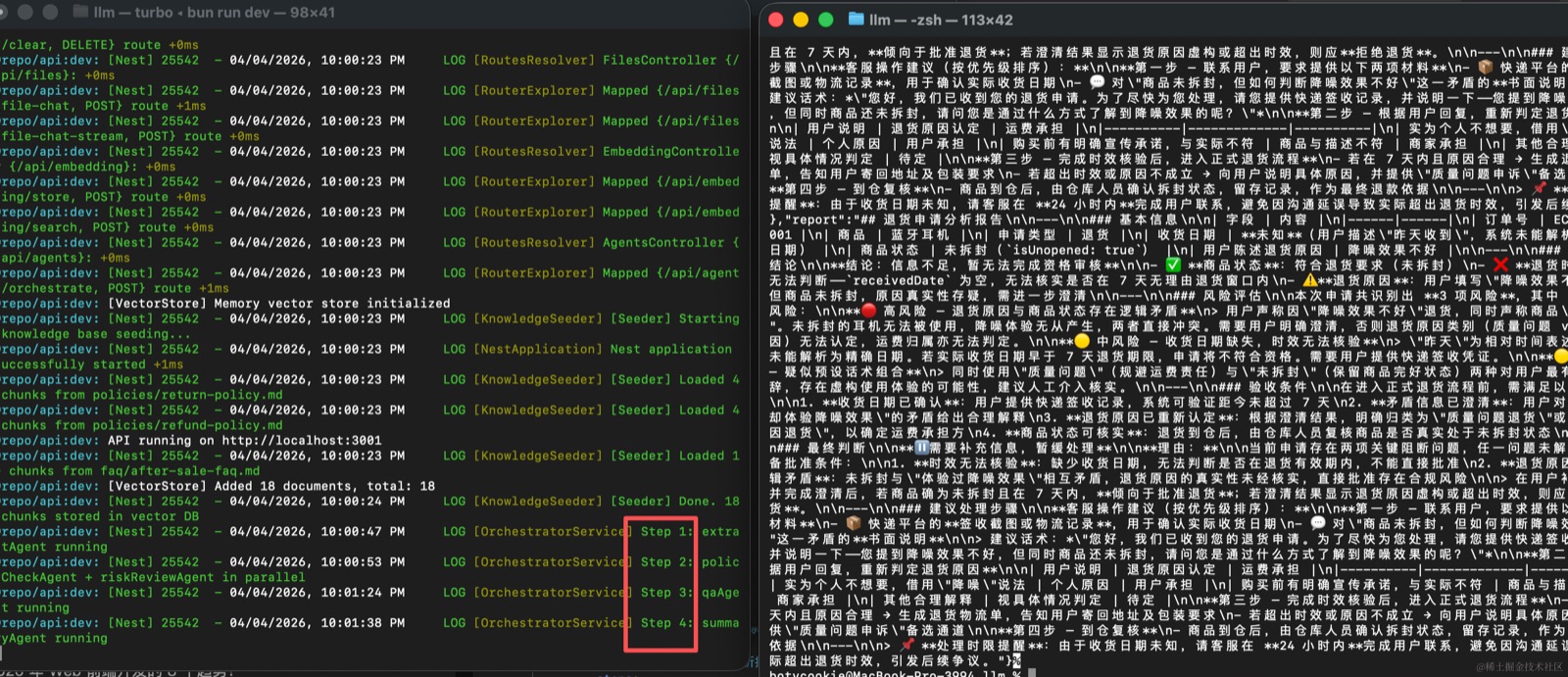
场景 B 的 status 为 need_clarification,clarificationQuestions 数组非空,usedAgents 仅含 RequirementExtractAgent。
4.6 统一入口:把 Memory、Tools、Embeddings、Multi-Agent 收成一个接口
-
🤖 用 AI 生成本节代码(对应 4.6)
将以下 Prompt 粘贴到 Claude CLI 中执行:
把第四章所有能力收回到 Nest 服务端统一入口,严格按以下要求执行:

1. 模块注册:
   - 新建 services/api/src/llm/advanced.module.ts
   - 注册 RunnableMemoryService、EmbeddingService、VectorStoreService、FilesystemService、OrchestratorService

2. 统一分析服务:
   - 新建 services/api/src/llm/advanced-analysis.service.ts
   - 实现 analyze(sessionId: string, input: string):
     1. 从 Memory 读取历史(getHistory)
     2. 拼接历史上下文和当前输入
     3. 调用 OrchestratorService 执行多 Agent 分析
     4. 如果不需要澄清,将报告写入 tickets/ 目录
     5. 用 appendMessage() 写回最终结论(不重新调用模型)
     6. 返回完整分析报告

3. 统一 Controller:
   - 新建 services/api/src/llm/advanced.controller.ts(@Controller('api/advanced'))
   - POST analyze:接收 { sessionId, input },返回完整分析报告

测试场景(同一 sessionId 依次发送前三轮,再发第四轮触发 analyze):
第四轮:'帮我判断一下能不能退,如果可以请告诉我下一步操作'
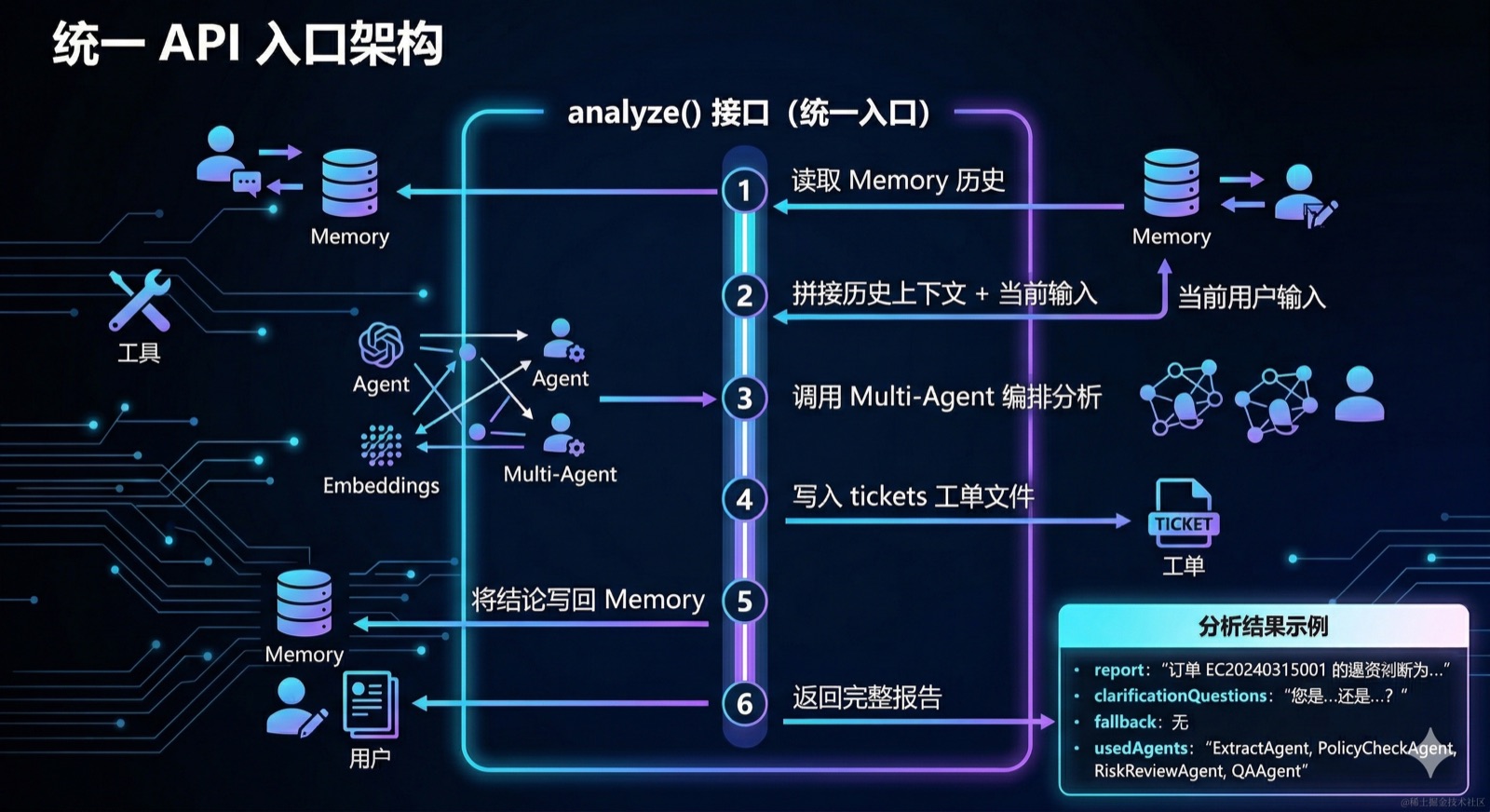
到这里,前面的能力都已经分别成立了。最后一步,是把它们整理成一个统一的业务入口,而不是继续停留在分散的 demo 上。
统一入口 analyze() 的职责很明确:
- 从 Memory 读取历史
- 拼接历史和当前输入
- 调用 Orchestrator 做多 Agent 分析
- 按需写出工单制品
- 用
appendMessage()写回最终结论
import { Injectable } from '@nestjs/common';

@Injectable()
export class AdvancedAnalysisService {
  constructor(
    private memory: RunnableMemoryService,
    private orchestrator: OrchestratorService,
    private files: FilesystemService,
  ) {}

  async analyze(sessionId: string, input: string) {
    const history = await this.memory.getHistory(sessionId);

    const enrichedInput = [
      history.length ? `历史上下文:${JSON.stringify(history)}` : '',
      `当前输入:${input}`,
    ].filter(Boolean).join('\n\n');

    const result = await this.orchestrator.orchestrate(enrichedInput);

    if (!result.clarificationQuestions?.length) {
      await this.files.writeFile(
        `tickets/EC20240315001-analysis.md`,
        result.report,
      );
    }

    // 用 appendMessage 写回结论,不重新调用模型
    await this.memory.appendMessage(sessionId, input, result.report);
    return result;
  }
}
🧪 验证步骤(对应 4.6)
用同一 sessionId 走完四轮对话,第四轮触发完整 analyze 链路:
# 第一轮
curl -X POST http://localhost:3000/api/advanced/analyze \
  -H "Content-Type: application/json" \
  -d '{"sessionId":"demo","input":"我买的蓝牙耳机降噪效果不好,想退货"}'

# 第二轮
curl -X POST http://localhost:3000/api/advanced/analyze \
  -H "Content-Type: application/json" \
  -d '{"sessionId":"demo","input":"订单号是 EC20240315001"}'

# 第三轮
curl -X POST http://localhost:3000/api/advanced/analyze \
  -H "Content-Type: application/json" \
  -d '{"sessionId":"demo","input":"我是昨天收到的,还没拆封"}'

# 第四轮:触发完整分析
curl -X POST http://localhost:3000/api/advanced/analyze \
  -H "Content-Type: application/json" \
  -d '{"sessionId":"demo","input":"帮我判断一下能不能退,如果可以请告诉我下一步操作"}'

# 验证工单文件落盘
cat workspace/tickets/EC20240315001-analysis.md

# 验证 Memory 中写回了最终结论
curl "http://localhost:3000/api/memory/history?sessionId=demo"
验收标准:第四轮返回完整 report;tickets/EC20240315001-analysis.md 存在且与报告内容一致;getHistory 最后一条 AI 消息是报告内容,而非模型重新生成的聊天回复。
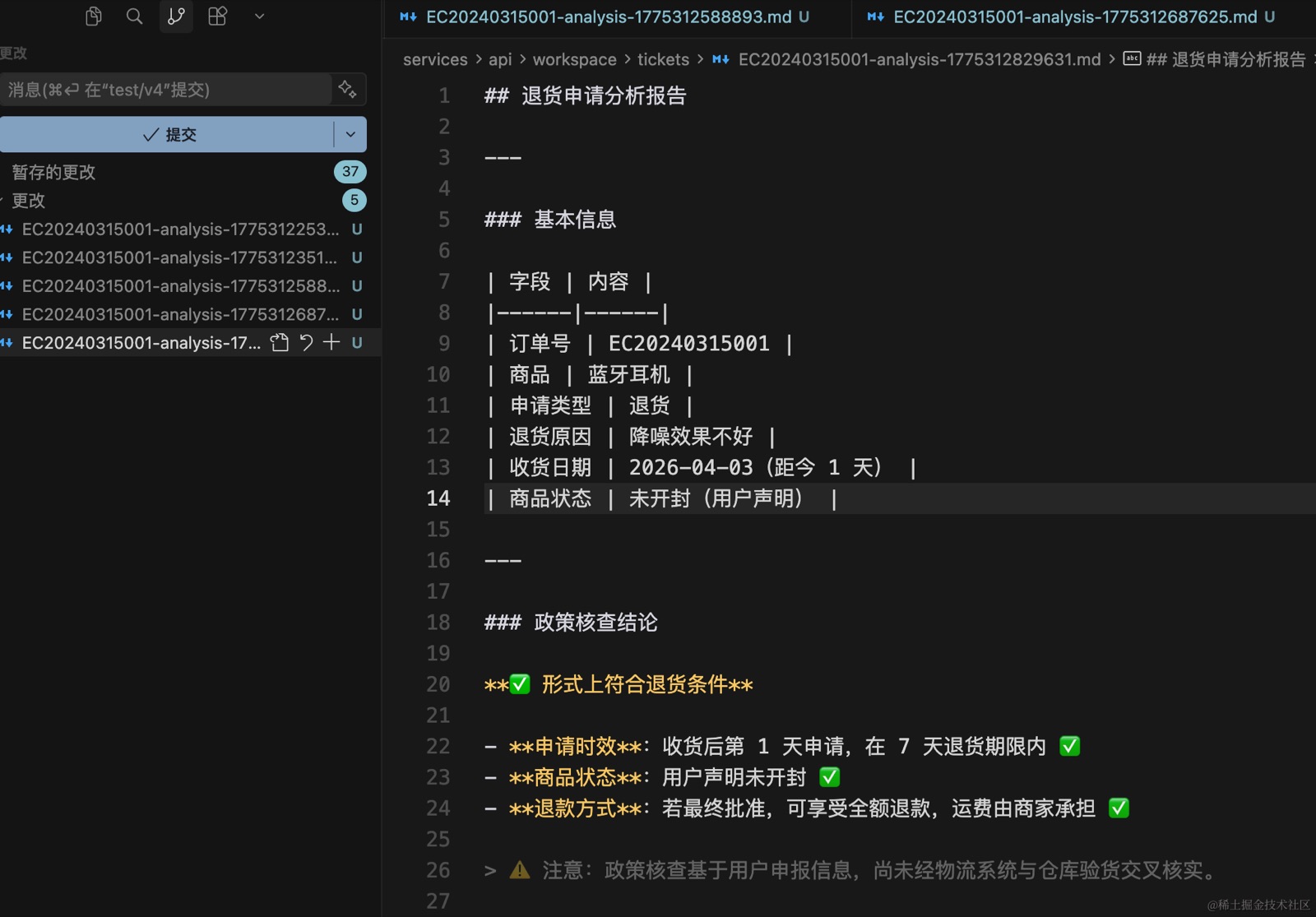
这个统一入口做完之后,同一张工单的处理链路就闭合了:历史不会丢,订单能查,政策能读,分析能拆,结果能落盘,结论还能写回记忆。
到这里,它才从单次问答接口变成了可持续对话的业务系统接口。
4.7 本章小结
这一章围绕同一张退货工单,逐步为系统补齐了四项核心能力:
- Memory:用
RunnableWithMessageHistory保持会话上下文,配合trimMessages控制长对话的 Token 成本,解决多轮对话中信息断裂的问题。 - Tools:定义
query_order、query_product、read_file、write_file四类业务工具,让模型能够主动读取真实数据、查询退货政策,并将分析结论写入工单文件,产出持久化制品。 - Embeddings + Vector Store:使用本地多语言小模型对政策文档和 FAQ 进行向量化,存入
MemoryVectorStore,为后续语义检索和 RAG 链路打下基础。 - Multi-Agent:将退货分析拆解为抽取、政策校验、风控审查、QA 生成、汇总五个专职 Agent,以固定编排(Fixed Workflow)串联执行,信息不足时提前返回澄清问题。
最终通过统一的 analyze() 接口,将历史读取、多 Agent 分析、工单落盘与记忆写回收敛为一条端到端链路。系统不再是一次性问答接口,而是可持续对话、可追溯制品的业务处理单元。
写在最后🧪
这里是言萧凡的 AI 编程实验室。 我会在这里持续记录和分享 AI 工具、编程实践,以及那些值得沉淀下来的高效工作方法。 不只聊概念,也尽量分享能直接上手、能够复用的经验。 希望这间小小的实验室,能陪你一起探索、实践和成长。2026 年,一起进步。
有兴趣的话可以添加我的微信号一起交流,不仅是编程也可以是畅谈人生。